Riaz GSE91061 design. The diagram records the before/during and response-group structure used by this example; it does not display a result or a biological measurement.
For one DE without a study file, start with Riaz ON. This guide covers the full prepared PRE/ON study.
This example asks how transcriptional programmes differ before and during nivolumab, both within response groups and between patients with complete or partial response (CR/PR) and patients with progressive disease (PD). It starts from reviewed, already fitted RNA-seq results. You can therefore create, plan, run and recognise the lisaR project without downloading the original study files or fitting DESeq2 again.
Riaz GSE91061 design. The diagram records the before/during and
response-group structure used by this example; it does not display a
result or a biological measurement.
The prepared design has 26 complete patient pairs: eight CR/PR and 18 PD. One before-treatment and one on-treatment sample are retained for each patient. The accompanying study is Riaz N, Havel JJ, Makarov V, et al. Tumor and Microenvironment Evolution during Immunotherapy with Nivolumab. Cell 2017;171:934-949, GEO GSE91061.
The prepared tutorial executes two differential expression analyses
and one LISA profile contrast across GOBP-C2,
GOMF, GOCC and PATHWAYS.
| DE input | Comparison | Upstream model |
|---|---|---|
responders_vs_pd_pre |
CR/PR minus PD before treatment | Cross-sectional comparison adjusted for prior ipilimumab |
responders_vs_pd_on |
CR/PR minus PD during treatment | Cross-sectional comparison adjusted for prior ipilimumab |
The contrast response_separation_by_time compares ON (A)
minus PRE (B). A positive difference means a higher plotted category
mean NES during treatment. This is a descriptive comparison of
enrichment profiles, not a fitted interaction test. Both STANDARD and
FULL use these same two analyses and this one contrast. No other DE
analysis must run first. The original bundle retains additional upstream
study results as provenance; the tutorial does not run them.
Use a short writable project root. The examples below use
D:/lisa on Windows; change the drive if needed. Avoid
nesting the project under several long folder names. Preparation creates
study.yml, short inputs under data/ and a
provenance/path_map.tsv linking them to their original
names and hashes. Results go to out/. Scientific comparison
names and directions are unchanged.
Install lisaR as described in Installation, and prepare the external membership resource as described in Resources and provenance. Then obtain the reviewed Riaz bundle in a new destination:
library(lisaR)
root <- if (.Platform$OS.type == "windows") "D:/lisa" else "~/lisa"
root <- path.expand(root)
dir.create(file.path(root, "bundles"), recursive = TRUE, showWarnings = FALSE)

bundle <- install_lisa_example_bundle(
  "riaz-gse91061",
  destination = file.path(root, "bundles", "riaz")
)
bundle$next_command
The default source is a versioned public release in
DBM-OlmedaLab/lisaR-example-data. The installer verifies
its pinned archive and member checksums before promoting the bundle. A
verified cached archive can be reused offline. This acquisition step
does not fit a model or run enrichment.
bundle$next_command is a complete POSIX shell command.
If you are working in RStudio, the following R equivalent uses the same
active R installation.
project <- normalizePath(file.path(root, "riaz"),
                         winslash = "/", mustWork = FALSE)
Sys.setenv(
  LISAR_RIAZ_PREPARED_BUNDLE = bundle$bundle,
  LISAR_RIAZ_PROJECT_DIR = project
)
example_dir <- system.file("examples", "riaz-gse91061", package = "lisaR")
rscript <- file.path(R.home("bin"), "Rscript")
prepare_script <- file.path(example_dir, "scripts", "11_prepare_prepared_project.R")
stopifnot(system2(rscript, c("--vanilla", shQuote(prepare_script))) == 0L)
Preparation writes the study files and validates their resources
without running GSEA. It reports
RIAZ_PREPARED_PROJECT=PASS. A new project directory is
required. The installed standard configuration uses
lisa_dictionary_core@1.0.0,
msigdb_term2gene@2026.1 and
lisa_category_map@1.0.0. Older prepared configurations may
retain historical pinned dictionary versions; lisaR reads those original
resources rather than silently replacing them. This is still a prepared
project, not a completed scientific result.
After preparation, the study file is study.yml within
project. It requests STANDARD and the four semantic
collections, with Hallmarks and native maps disabled. Inspect the
comparisons, readiness and estimated output before you decide to execute
it:
config <- file.path(project, "study.yml")
study <- yaml::read_yaml(config)
print(data.frame(
  analysis = vapply(study$single_de, `[[`, character(1), "analysis_id"),
  comparison = vapply(study$single_de, `[[`, character(1), "comparison"),
  positive_direction = vapply(study$single_de, `[[`, character(1),
                              "positive_direction")
))
print(study$collections)
print(study$report)

validation <- validate_lisa_config(config, check_files = TRUE)
stopifnot(validation$execution_ready)
output_plan <- plan_lisa_outputs(config)
print(output_plan$summary)
plan_lisa_outputs() estimates the intended products. It
does not execute the analysis. The installed stage-09 runner then
creates a separate dry-run configuration, checks that plan, revalidates
the unchanged execution configuration, computes enrichment and verifies
the result. It does not refit DESeq2.
run_script <- file.path(example_dir, "scripts", "09_run_lisa_example.R")
stopifnot(system2(rscript, c("--vanilla", shQuote(run_script))) == 0L)
browseURL(file.path(project, "out", "report_index.html"))
The runner prints LISA_PLAN_GATE=PASS after recognising
the dry-run directory as a planning artefact rather than a scientific
result. It prints LISA_STANDARD_GATE=PASS only after the
scientific run at project/out verifies as a
scientific_run. Keep that directory and its saved
configuration together.
You should see the PRE and ON analysis identifiers and their single
contrast in the STANDARD report. The category plot below is the saved
on-treatment responders_vs_pd_on result for
GOBP-C2, not the upstream interaction and not the later
A-minus-B profile contrast.
After a verified standard run is available, the installed
selected-report script creates a new integrated report from saved
results. See Scientific
report for the general saved-result builder. This is distinct from
running run_lisa() with a full report mode. The
selected-report script does not refit DE or rerun GSEA. With
--complete-missing true, it reuses saved figures and
creates only missing presentation products.
source_dir <- file.path(project, "out")
output_dir <- file.path(project, "extra")
stopifnot(dir.exists(source_dir), !file.exists(output_dir))
script <- system.file("scripts", "build_selected_LISA_report.R", package = "lisaR")

status <- system2(file.path(R.home("bin"), "Rscript"), c(
  "--vanilla", shQuote(script),
  "--source-dir", shQuote(source_dir),
  "--output-dir", shQuote(output_dir),
  "--analyses", "responders_vs_pd_pre,responders_vs_pd_on",
  "--contrasts", "response_separation_by_time",
  "--complete-missing", "true",
  "--title", shQuote("Response-group separation during and before nivolumab")
))
stopifnot(status == 0L)
browseURL(file.path(output_dir, "report_index.html"))
source_dir must be the verified standard-result
directory and output_dir must be a new directory outside
it. The script checks that the selected contrast refers only to the two
selected analyses, retains the saved source identity, and verifies that
the integrated navigation contains exactly the two named analyses and
the response_separation_by_time contrast. In that contrast,
the saved during-treatment profile is A and the saved baseline profile
is B. It is not a fresh time-by-response interaction test. Optional
native KEGG maps require their own authorised local snapshot and are not
enabled by this command.

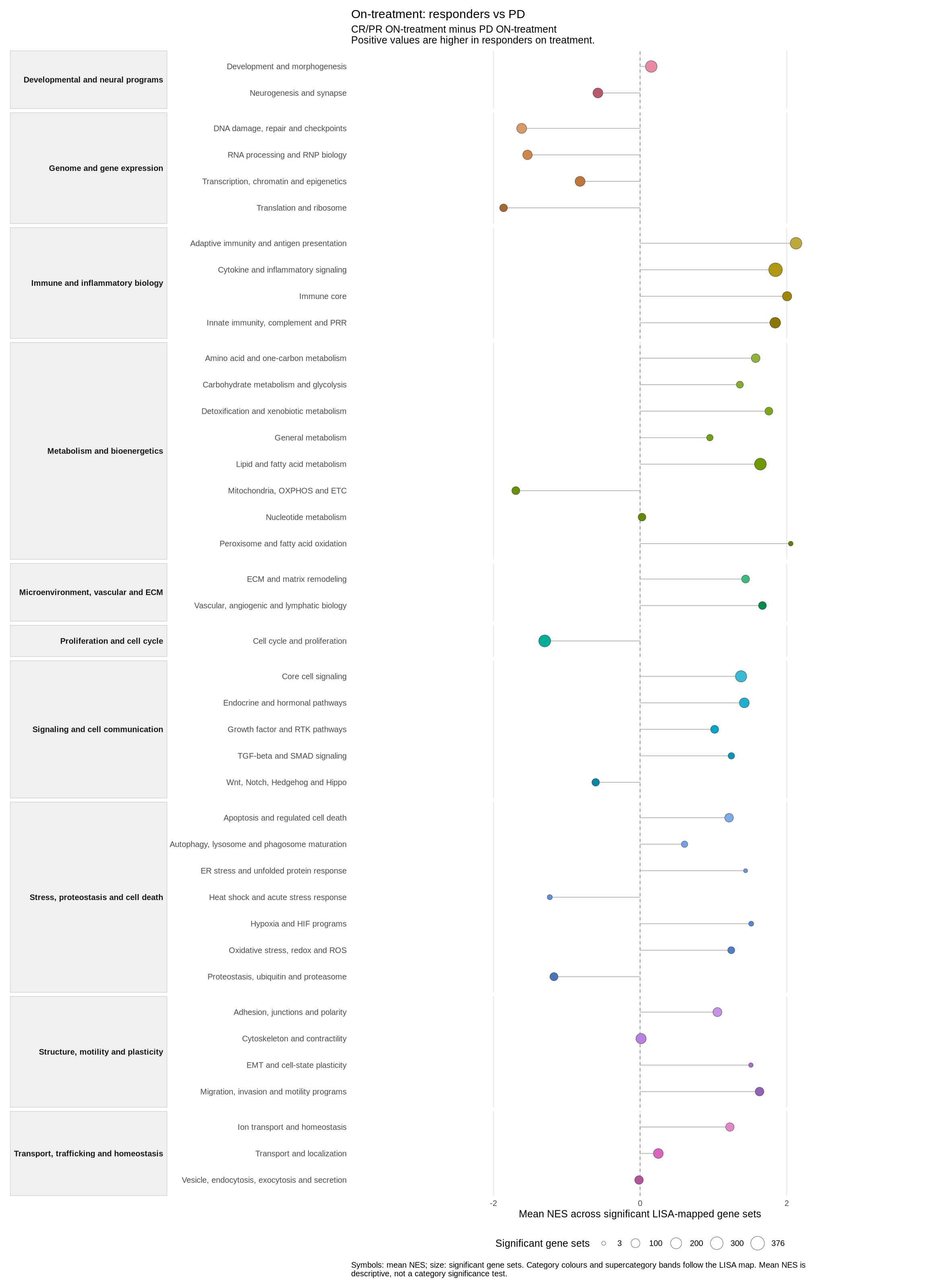
A saved selected-FULL category overview for the on-treatment
comparison. Each point is the mean NES of significant unique member gene
sets (GSEA adjusted P at or below 0.25), with point size showing their
count. Positive NES follows CR/PR minus PD during treatment. Colours and
bands organise categories and supercategories; they do not define a new
significance test.
This archived selected-FULL illustration is descriptive. Its screenshot and source table do not establish exact identity with the saved category-inference rows used by a newer STANDARD report, so no adjusted-P stars are overlaid on this image. In a current verified run, use its own Category significance view and card to read the four-star threshold, exact P and d/N; never infer a category P from this figure’s mean NES or member-set FDR.
The prepared route is the recommended route when the reviewed bundle
is available. Reconstruction is separate: the installed scripts
00 through 05 obtain and verify the required
original study files, rebuild the paired cohort and upstream DE outputs,
and then feed the ordinary preparation stages. Stage 00 downloads four
GEO files and verifies six publisher supplements that you obtain
separately from the
article; it is not an alternative source for the prepared bundle and
it is not a lightweight first run.
Use the installed example directory to inspect the reconstruction scripts and their input contract:
example_dir <- system.file("examples", "riaz-gse91061", package = "lisaR")
list.files(file.path(example_dir, "scripts"), pattern = "^0[0-5]_", full.names = TRUE)
The prepared and reconstruction routes preserve different provenance. Neither route changes the declared response groups, comparison directions, selected collections or saved FULL product scope.